How to Make an AI Profile Picture From Your Own Photo
A step-by-step guide with real screenshots: upload a selfie and create a LinkedIn headshot, a golden-hour portrait, a Korean-style ID photo, a black-and-white portrait and an anime avatar, all from the same photo.

Try 7 days for $2.50 · or 25% off your first month · Cancel anytime
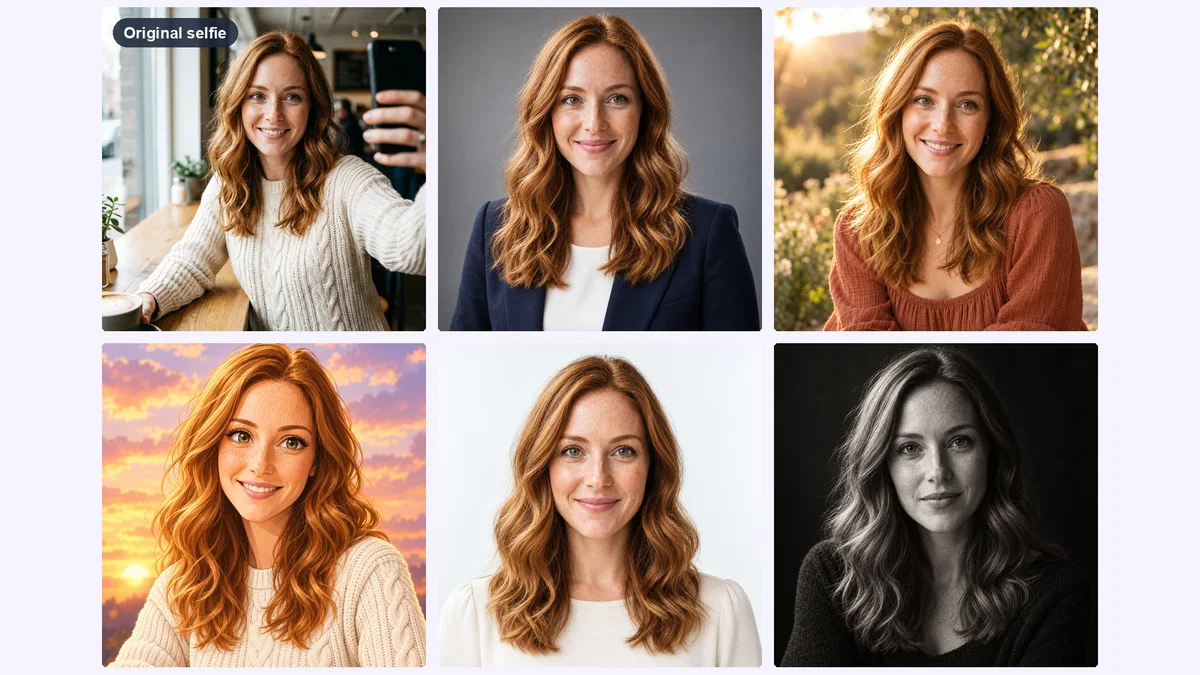
Key Takeaways
- One clear selfie is enough: upload it as a reference image and the AI keeps your face while changing the style, outfit and background.
- Bulk mode writes one detailed prompt per style, so you can generate a whole set of profile pictures in a single run.
- Pick the style for the platform: a clean headshot for LinkedIn, a lifestyle portrait for Instagram, an avatar for YouTube, Twitch or Discord.
- Keep the face centered with some space around it: every platform crops profile pictures to a circle.
Your profile picture is the smallest image you own and the one people see most: next to every comment, every message, every post. Most of us use whatever selfie looked okay at the time. An AI profile picture fixes that in a few minutes, without a photographer: same face, better light, the right outfit and a background that fits the platform.
This guide walks through the whole process with screenshots from Postcrest. We started from one casual selfie and created five profile pictures from it: a LinkedIn headshot, a golden-hour portrait, a Korean-style ID photo, a black-and-white portrait and an anime avatar.
Our model for this guide is Maya, a demo persona. Her "selfie" was itself generated with AI so we could show the full workflow without using a real person's photo. With your own selfie, the steps are exactly the same.
What Makes a Good Profile Picture
A profile picture is shown tiny and usually as a circle. The ones that work have:
- The face as the subject. Head and shoulders, face centered, eyes visible.
- Good, soft light. No harsh shadows across the face, no backlit silhouette.
- A calm background. Plain studio grey, soft bokeh or a simple color. Busy backgrounds turn into noise at small sizes.
- An expression that fits the platform. Approachable for LinkedIn, more personal for Instagram, playful for gaming and creator profiles.
- A likeness people recognize. It should still look like you on a video call. That is the line between a great AI profile picture and a fake one.
Step 1: Choose the Right Selfie
The AI can change your clothes, light and background. It cannot invent details it never saw. Pick a photo where:
- your face is sharp, well lit and looking roughly at the camera,
- nothing covers it (no sunglasses, hands, hair across the eyes or heavy filters),
- you are the only person in the shot.
This is the casual selfie we started from: daylight, a café, a phone in hand. Nothing special, and that is fine.
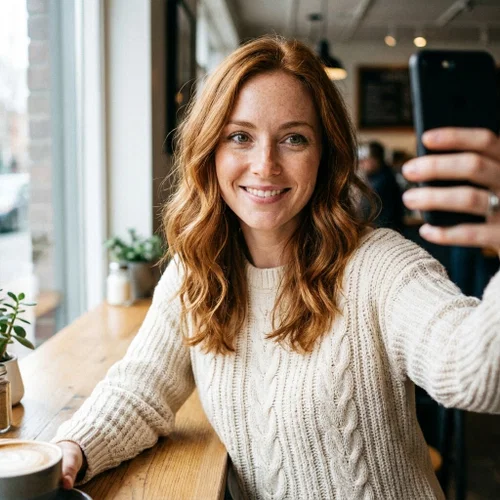
Two or three photos from slightly different angles make the likeness even more stable. You can add up to ten.
Step 2: Upload Your Photo to Create Image From Person
You do not need to create a character for a profile picture. Open a workspace and go to Workflows → Character Image (the tool is called Create Image from Person), then set it up:
- Model: GPT Image 2.5. It keeps your face recognizable and follows detailed style prompts closely.
- Image dimensions: 1:1, labelled "Instagram feed, profile". Square works on every platform.
- Resolution and quality: 1K and High. A square 1K image is 1024×1024, more than any platform needs. 2K costs twice the credits.
- Who should the image look like? Choose From reference images, then upload your selfie (or pick it from your media library).
If you plan to reuse your face for posts, thumbnails and videos later, create a character from your photos instead and choose From character. Our YouTube thumbnail guide shows that route step by step.
Step 3: Describe Your Styles (or Let Bulk Mode Write the Prompts)
You can write one prompt and generate one style at a time. It is faster to use Bulk mode: describe all the styles you want in one sentence, choose how many prompts to generate, and click Generate prompts. Postcrest writes one detailed prompt per style (it costs 1 credit) and you can read and adjust them before generating anything.
This is what we asked for:
Profile pictures of the woman in the reference photo, one style each: a professional LinkedIn headshot in a navy blazer on a soft grey studio background; a warm golden-hour Instagram portrait outdoors; a clean Korean-style ID profile photo with soft beauty lighting; a moody cinematic black-and-white portrait. Head-and-shoulders framing, face centered, looking at the camera.
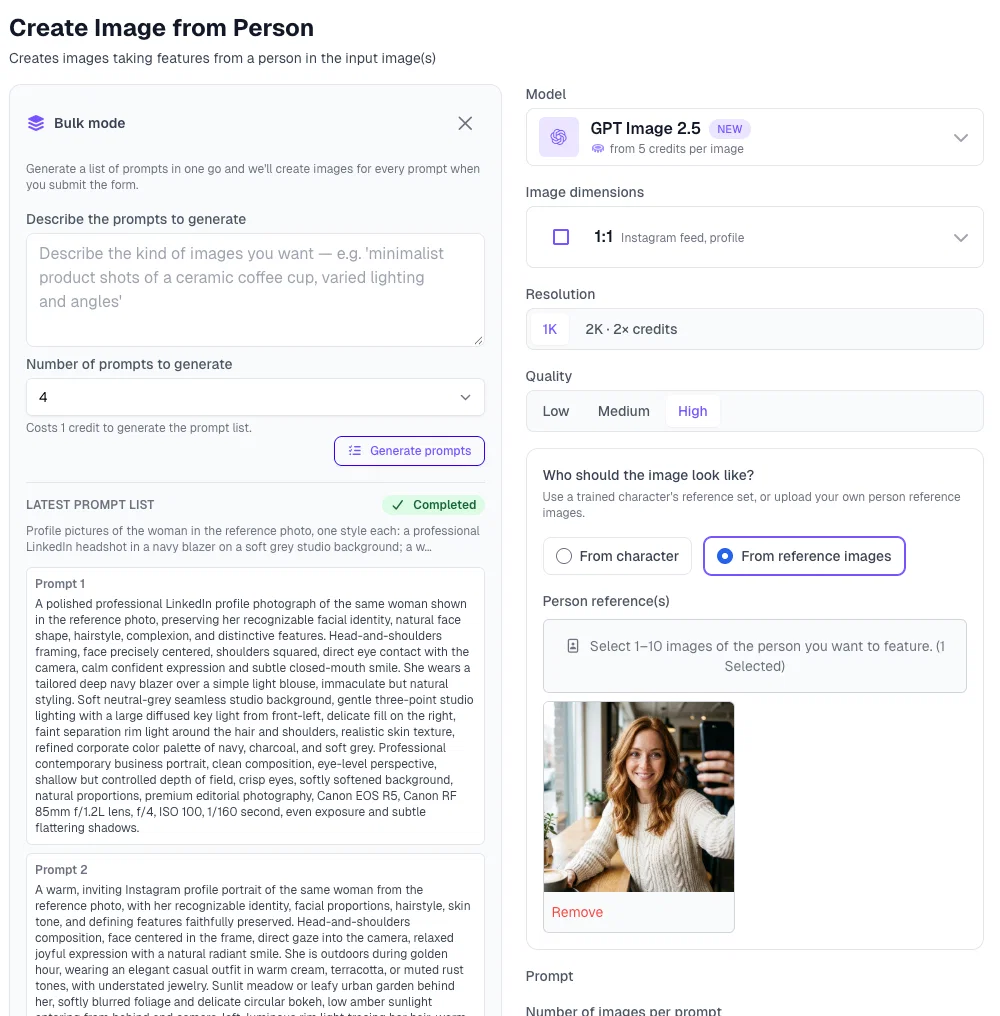
Notice what the generated prompts add on their own: "preserving her recognizable facial identity", lens and lighting details, a color palette and the framing. That extra detail is why bulk prompts tend to beat a quick one-liner.
Set Number of images per prompt to 1 for a first pass (or 2 if you want options per style) and click Create. The button shows the total credit price before you start.
Step 4: Compare the Results
About a minute later we had four profile pictures from one selfie. Same face, freckles and hair in every one, with completely different light, clothes and mood:
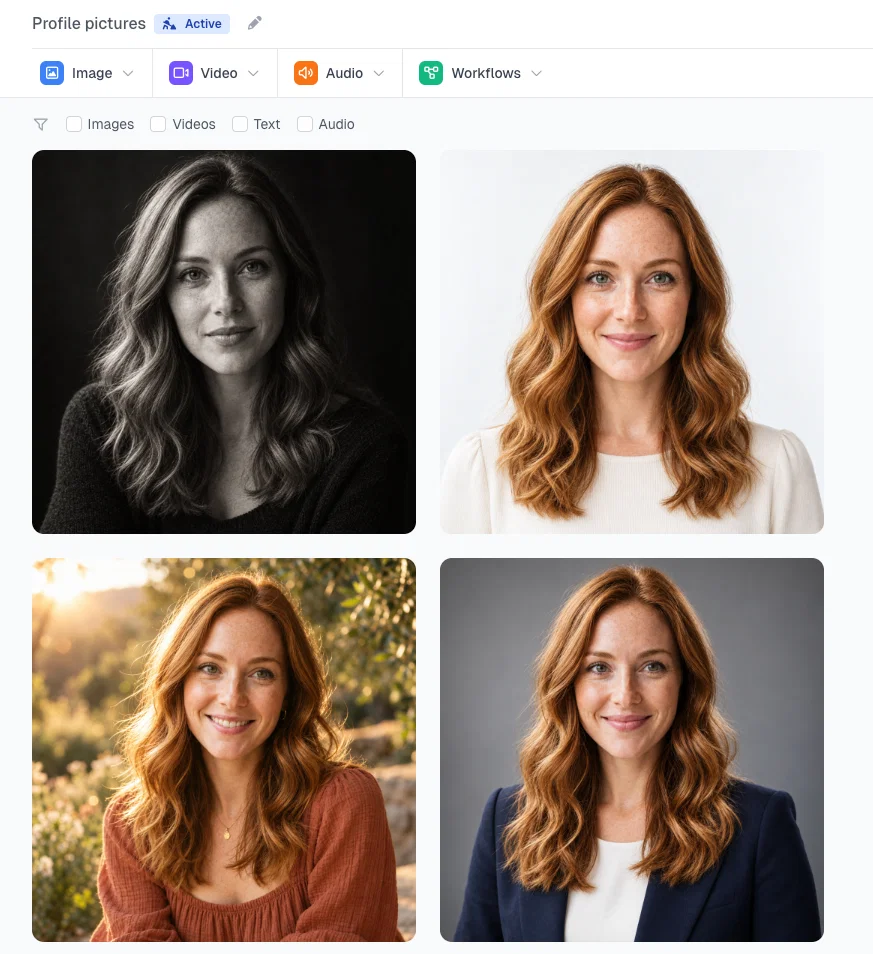
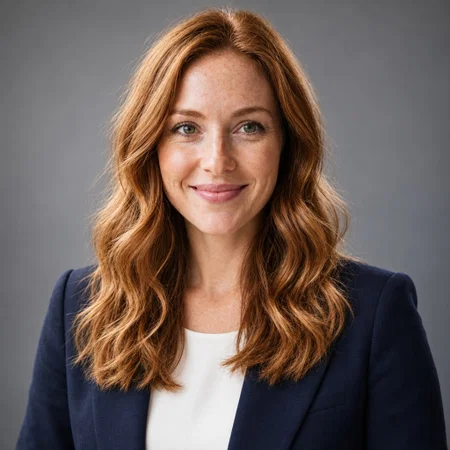
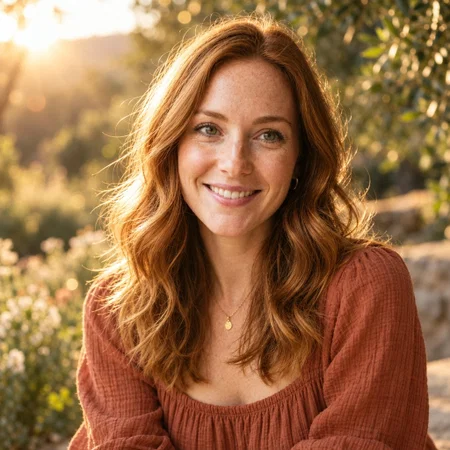
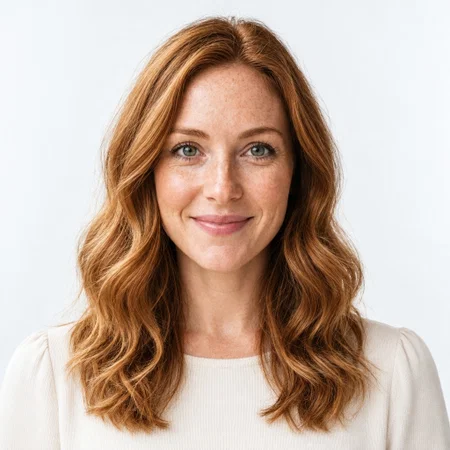
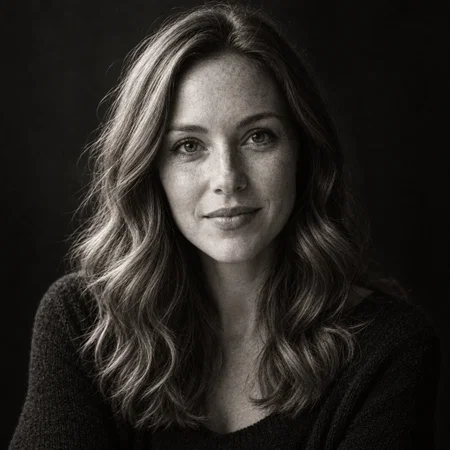
When you compare, look past the style and check the face: eye shape, nose, smile, hairline, freckles or moles. If one result drifts, regenerate just that style. If several drift, add a second and third reference photo.
Step 5: Add an Avatar Style (Anime or Cartoon)
For YouTube, Twitch, Discord or a creator brand, an illustrated avatar often works better than a photo. Use the same reference photo with a single prompt that names the style and the features to keep:
Turn the woman from the reference photo into a cute anime-style profile picture avatar: same wavy auburn hair, freckles and green eyes, soft cel shading, big expressive eyes, gentle smile, cream knit sweater, warm pastel sunset sky background with soft clouds, head-and-shoulders framing, centered, clean lines, high detail anime illustration.
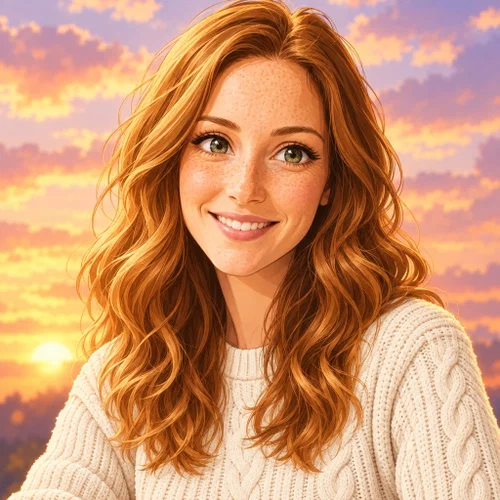
Listing the features to keep ("same wavy auburn hair, freckles and green eyes") is what makes the avatar recognizably you rather than a generic anime character.
Step 6: Crop, Download and Upload
Save the one you like to your media library and download it. At 1K every square result is 1024×1024 pixels, above what any platform recommends, so you can upload it as it is.
Two things to check before you upload:
- The circle crop. Instagram, LinkedIn, YouTube, X, TikTok and Discord all show profile pictures as circles. Keep the face centered with some space above the head. Preview it with the circle crop tool.
- The file size. If a platform rejects the file, convert it to JPG with the PNG to JPG converter.
Which Style for Which Platform
| Platform | Style that works | Prompt keywords |
|---|---|---|
| Professional headshot | navy blazer, soft grey studio background, three-point lighting, approachable smile | |
| Lifestyle portrait | golden hour, outdoor bokeh, natural makeup, relaxed | |
| YouTube, Twitch, Discord | Avatar or bold portrait | anime style, cel shading, bright solid background, expressive |
| Company website, press | Black-and-white or studio | monochrome, fine-art portrait, dark backdrop |
| Korean or Japanese apps, ID-style profiles | Clean ID photo | soft beauty lighting, plain light background, symmetrical framing |
Profile Picture Prompts You Can Copy
Use them with your own reference photo. Change the outfit and colors to taste.
- "Professional LinkedIn headshot of the person in the reference photo, preserving their facial identity, tailored navy blazer, soft grey seamless studio background, three-point lighting, confident approachable smile, head-and-shoulders, centered."
- "Warm golden-hour portrait of the person in the reference photo in a meadow, sun behind them creating a soft rim light, creamy bokeh, relaxed natural smile, head-and-shoulders."
- "Clean Korean-style ID profile photo of the person in the reference photo, soft beauty lighting, plain light beige background, symmetrical framing, natural makeup, neutral pleasant expression."
- "Moody black-and-white portrait of the person in the reference photo, single soft key light, dark textured background, fine-art photography, calm direct gaze."
- "Cute anime-style avatar of the person in the reference photo, same hair color, eye color and features, soft cel shading, pastel background, head-and-shoulders, centered."
- "3D animated movie style avatar of the person in the reference photo, same hairstyle and features, big friendly eyes, soft studio lighting, solid teal background."
There are many more in our AI profile picture prompts collection, and plenty of examples on the Korean profile photo page.
Want More Than a Profile Picture?
Finished examples in every style are on the AI profile picture generator page. The same selfie can carry a whole photoshoot: AI portraits of yourself in cinematic, studio and painted styles, seasonal AI Christmas photos, or a full headshot set for a team page.
Start now and turn your best selfie into a profile picture that actually looks like you on a good day.
Frequently Asked Questions
Q: Can I make an AI profile picture from just one photo?
A: Yes. Upload one clear, well-lit selfie as a reference image and choose the style you want. Two or three photos from different angles make the likeness even more consistent.
Q: Will the AI profile picture still look like me?
A: With a good reference photo and a model that keeps identity well (we used GPT Image 2.5 on High quality), the face, hair and features stay recognizably yours. Check eyes, nose and smile, and regenerate any result that drifts.
Q: Is it okay to use an AI headshot on LinkedIn?
A: Use one that looks like you today: same face, hairstyle and age. People will meet you on video calls, so an accurate AI headshot builds trust and an idealized one breaks it.
Q: Can I make an anime or cartoon profile picture of myself?
A: Yes. Use your selfie as the reference and describe the art style plus the features to keep, like hair color, eye color and freckles. That keeps the avatar recognizable.
Q: What size should a profile picture be?
A: A square image of at least 400×400 pixels works on almost every platform. Postcrest's square results are 1024×1024 at 1K (2048×2048 at 2K), so they are sharp everywhere. Keep the face centered, because platforms crop to a circle.
Q: How much does an AI profile picture cost in Postcrest?
A: Each image costs credits from your plan, and the exact price is on the button before you generate. Cheaper models cost less per image. See credit costs for the full list.